
🔍 What Is the Perfect Inventory Manager?
The Perfect Inventory Manager is an all-in-one stock control system designed for businesses and institutions that manage physical goods across multiple stores or departments.
Whether you run a hospital, retail chain, pharmacy, clinic, or warehouse, this system gives you a real-time overview of:
- What’s in stock
- What’s running low
- What’s expiring
- What’s being moved between stores
It allows you to:
- Track inventory by store (e.g., Pharmacy, Store Room, Equipment Room)
- Borrow, dispense, or transfer items
- Create bills, sales, invoices, or quotations
- Run audits and stock takings
- Monitor low stock or expiry
- Generate reports and print receipts
- Manage purchases and expenses
- View detailed timelines and attach files or comments to any product
✅ All of this is packed into a clean, responsive interface with user roles, permissions, charts, CSV exports, and even barcode printing built in.
🧑💼 Who Is It For?
| Role | How They Use It |
|---|---|
| Inventory Officers | View and update stock, perform audits, monitor expiry/alerts |
| Store Managers | Track transfers, approve stock movement, view profit reports |
| Sales Staff | Create invoices, dispense items, generate quotations |
| Pharmacists | Borrow or dispense medication, set expiry dates, restock shelves |
| Admin Users | Control user permissions, add stores, upload inventory via CSV |
🌍 Why It’s “Perfect”?
- Multi-store support – manage all branches in one place
- Fast data entry – bulk upload, import/export, and smart search
- Offline-friendly – works even in areas with poor or unstable internet
- Highly customizable – add your own stores, services, roles, and fields
- Role-based access control – ensure each user only sees what they need
- Visual and printable – barcodes, receipts, exports, and analytics all built-in
🚀 Getting Started
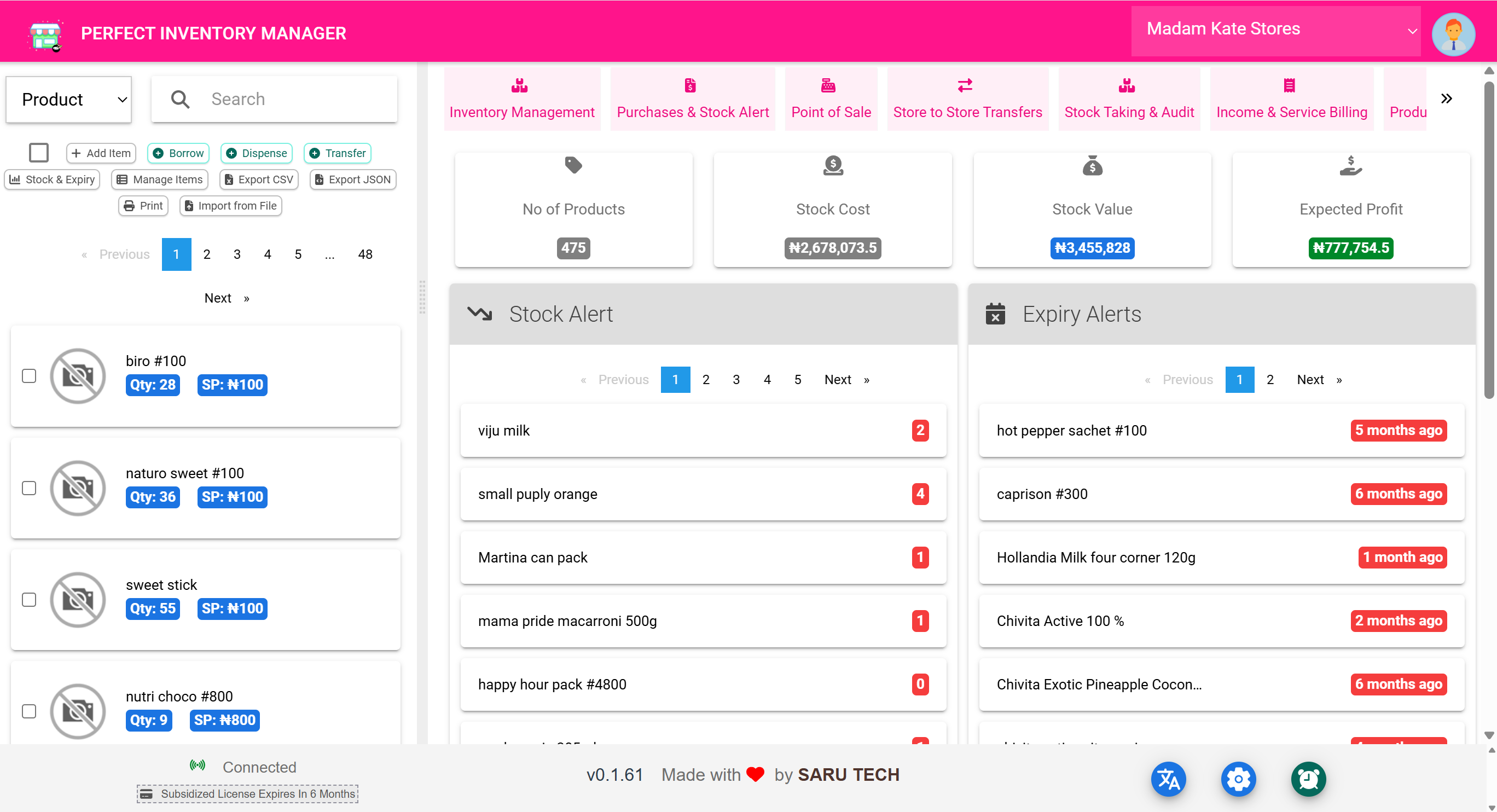
When you log in, you’re brought to the Inventory Management Page , which is your control center. From here, you can:
- View stock by store
- Navigate to any module using the top scrollable menu (like Borrow, Transfer, Sales, etc.)
- Select items and perform actions on them
- Add new products or import them
- See alerts and financial summaries
✅ Let’s now begin a deep dive into this main page.
📦 Part 1: Inventory Management Page (Overview)
This page is the daily workspace for users managing inventory. Everything starts here — whether you're checking what’s in stock, processing transfers, dispensing items, or looking for low or expired products.