
The Perfect Hospital Bed Management System integrates core hospital workflows with financials and accountability. This means you can handle billing, assign staff tasks, and generate executive-level reports—all from the same interface.
💳 A. Patient Billing from Bedside
🧭 Access:
Billing can be initiated in two ways:
- From the right sidebar while a patient is selected
- From the “Billing” button in the top toolbar
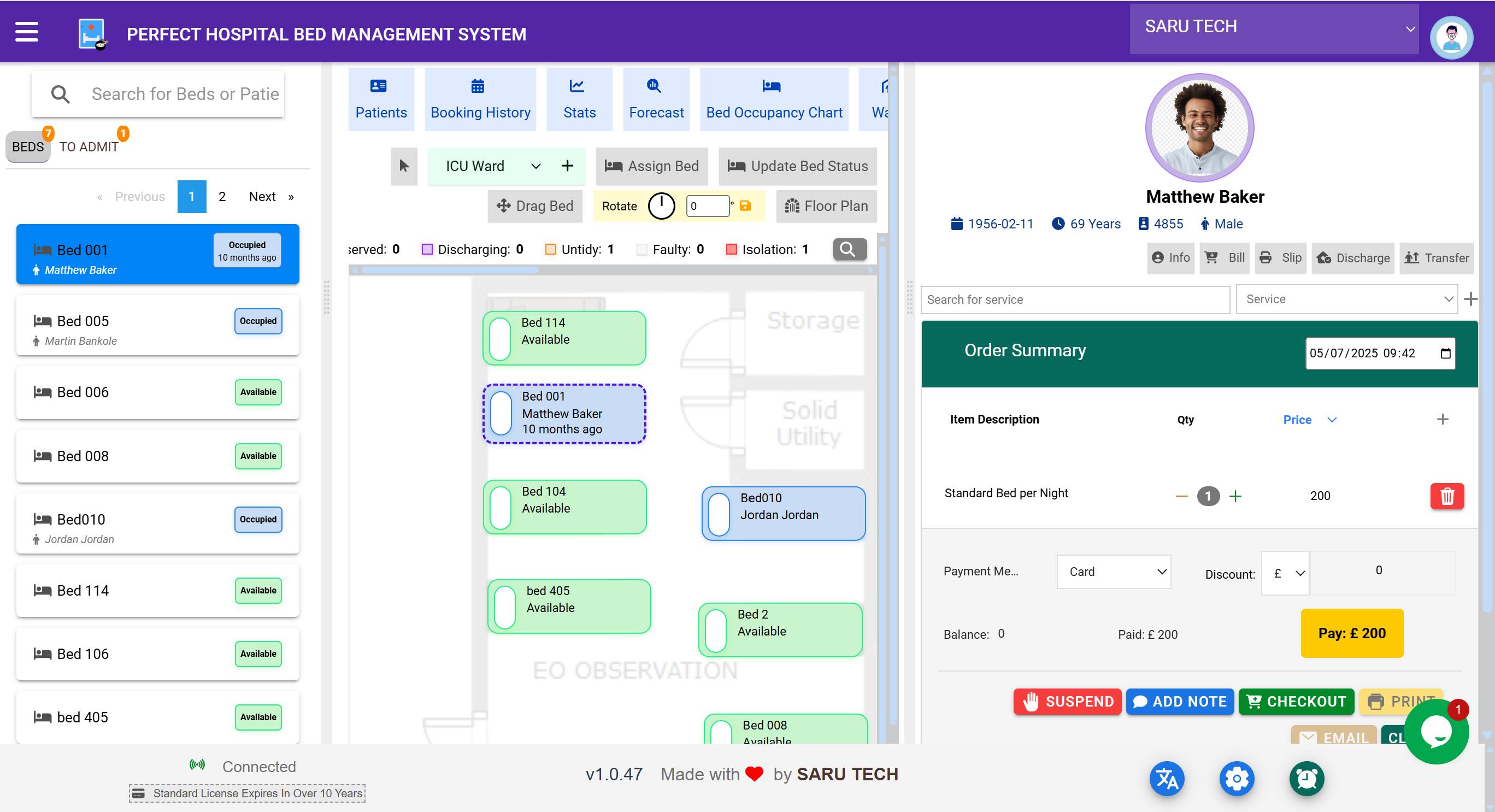
🧾 Workflow:
- Select a patient’s bed
- Click “Bill”
-
The billing panel opens:
- View current items billed
- Add services or products (e.g., bed fee, transfer fee)
- View total cost and outstanding balance
- Checkout the bill when the patient is ready to pay
- Optionally print or email the receipt
🧠 You can toggle the billing panel on/off by clicking the Bill button again.
💸 Payment Methods Supported:
- Cash
- Card
- Mobile Money
- Bank Transfer
All bills are stored under the
income
section of the patient profile and linked to admission records.
📋 B. Task Management – Assigning Duties
Tasks help maintain accountability across all roles, such as:
- Cleaning untidy beds
- Preparing beds for isolation
- Transporting a patient for transfer
🧭 Access:
Click the “Tasks” button from the toolbar.
✅ Task Fields:
- Title
- Assigned staff
- Priority level (Urgent, High, Medium, Low)
- Status (Todo, In Progress, Completed)
- Comments , Date , and Validation signature
Tasks can be linked to:
- Patients
- Beds
- Wards
💡 For example, when a patient is discharged and the bed is marked as Untidy , a task can be assigned to housekeeping to clean it.
📈 C. Reports – Analyze and Export Insights
The Reports module gives hospital managers and administrators the tools to make data-backed decisions.
🧭 Access:
Click “Reports” on the top toolbar.
📁 Types of Reports Available:
| Report Type | Description |
|---|---|
| Occupancy Reports | View utilization across wards and time periods |
| Transfer Logs | Analyze movement trends between wards |
| Discharge Volumes | Understand patient exit patterns |
| Billing Reports | Track payments, unpaid balances, and income per ward |
| Daily Activity Reports | Admissions, discharges, transfers summary for selected date range |
🧾 Filtering Options:
- Date range
- Patient type
- Ward
- Status (discharged, admitted, transferred)
📤 Export Formats:
- Excel (CSV)
📌 Reports are especially useful during audits, planning meetings, and performance reviews.